Search Console tells you where you show up on average, across every search. Rank Tracking answers a narrower, more useful question: for this keyword, in this country, where does this page rank today, and is it moving?
Step 1: Pick what to track
Track pairs, not pages: one page and the one keyword it's meant to win. For ieltsbandlift.com we started with three:
| Page | Keyword |
|---|---|
| Homepage | ai ielts coach |
| /resources/format-how-band-scores-are-calculated | how is ielts band score calculated |
| /resources/anatomy-of-a-band9-speaking-part2-answer | ielts speaking part 2 band 9 answer |
How we chose them:
- The page you most need to rank, usually your homepage, for what you actually are.
- One or two guides you've improved, like the Speaking Part 2 page from lesson 5.1, so you can see whether the work pays off.
- Every new article you publish (lesson 4.2), for its target keyword, from the day it goes live.
Free tracks 1 page, Pro 150 and Scale 400. Even with room for more, start with a handful you'll actually look at.
Step 2: Add them
Open Rank Tracking. Paste the page's full URL, type the keyword (or pick one you've analyzed), set the market and click Track. We used India / English, where our customers are (lesson 2.1). A keyword can rank #3 in India and nowhere in the US.
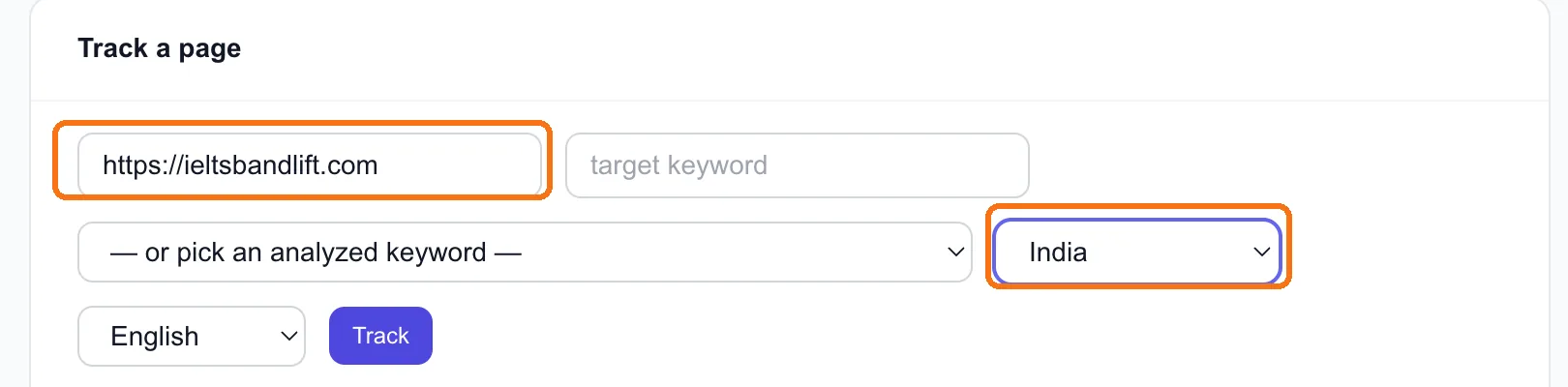
Two details that catch people out:
- The URL must match exactly what Google shows, including
https://and any trailing slash.https://ieltsbandlift.com/andhttps://ieltsbandlift.comare different strings, and a mismatch reads as "not found". - Check what you saved. The URL field starts with your domain filled in. We clicked into the middle of it, typed a full address, and saved three broken URLs like
https://ieltsbandlifhttps://ieltsbandlift.com/t.com. SEODojo now refuses an address like that, but glance at the table after adding anyway. A row that's wrong has a Remove button, which deletes it and its history.
Step 3: Know when positions update
Every tracked keyword is checked automatically every 2 days, so the history builds by itself. Need a position sooner? Check now runs a live Google search for every tracked keyword on the site, one search per distinct keyword. It's available once a week.
Step 4: Read the table honestly
Each row shows the keyword, the page, the market, the latest position and how many checks it has had.
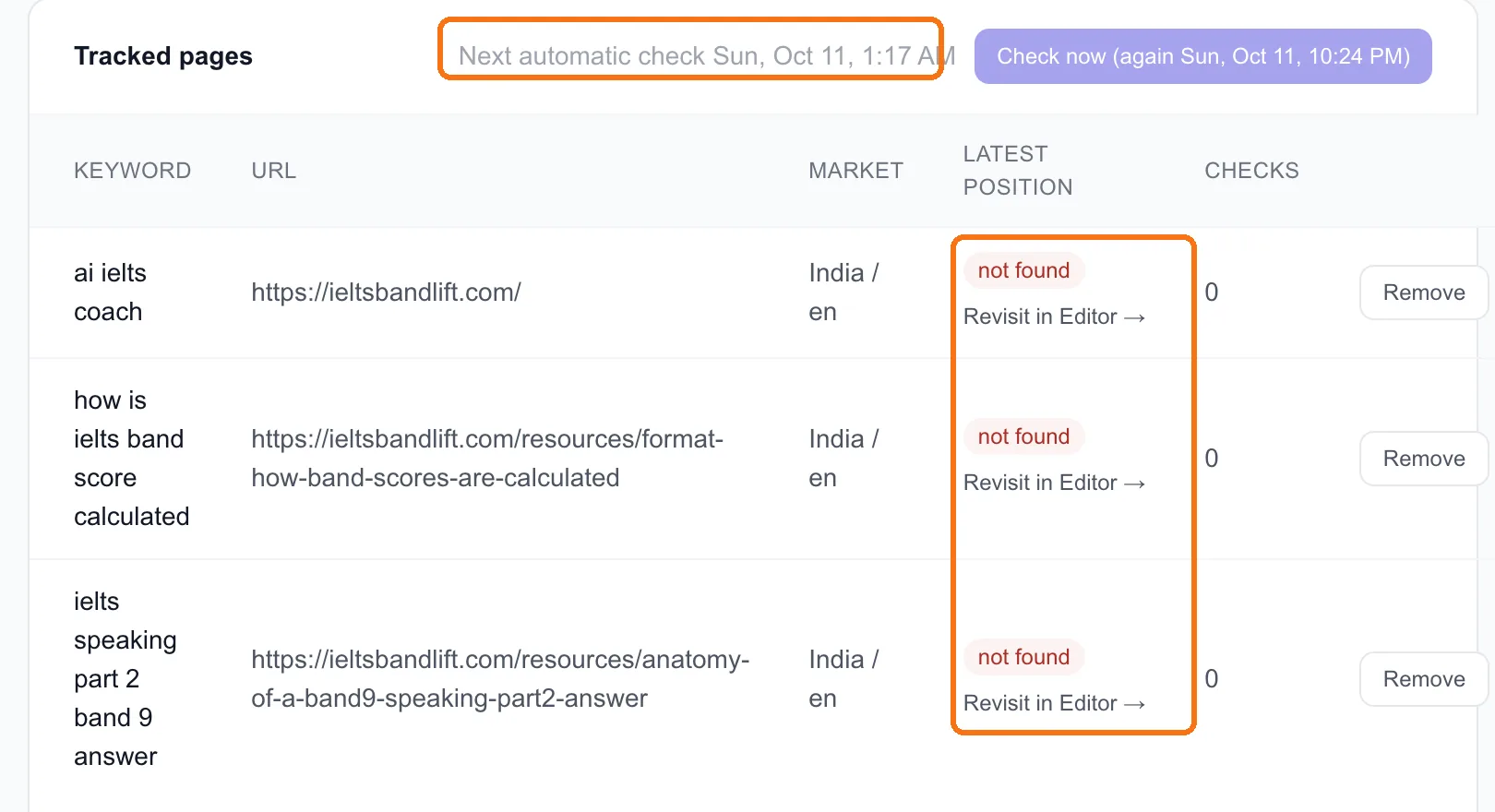
The most important thing to know: a check reads Google's top 10. If your page is there, you see its position. If it's anywhere below, from #11 to #1,000, you see "not found".
So "not found" doesn't mean Google doesn't know your page. It means you're not on page one yet. For a new site that's the normal starting point, and it's where ieltsbandlift.com is: our pages have been added, and the first automatic check hasn't run yet.
To see the movement before page one, use Search Console. On My Site (lesson 1.4), a page creeping from an average position of 25 to 14 is real progress, even while Rank Tracking still says "not found".
Tip: Once a keyword does reach the top 10, watch for drops. Content decay (lesson 6.2) flags tracked keywords that fall 3 or more places from their best in the past 30 days, or drop out of the top 10 entirely.
Step 5: Act on what you see
Each row has Revisit in Editor →, which opens that keyword in the Editor so you can compare your page with what ranks now (lesson 3.1). Use it when:
- A page is stuck between #6 and #10. It's close, and usually one missing section or a better opening away from the top five.
- A page dropped. Something above it changed. Compare and refresh, don't rewrite (lesson 6.2).
- A competitor keeps beating you for the keyword. Lesson 6.5 shows how to watch them.
Done when
- You're tracking 3–10 page and keyword pairs, each in the right market
- Every URL in the table is exactly right
- You know that "not found" means "not in the top 10 yet", and you check Search Console for progress below that
- You've decided which pages you'll revisit in the Editor first