Everything in Module 7 depends on one thing you can check in a minute: whether AI bots are allowed to read your site at all. A single line in robots.txt can quietly keep you out of every AI answer, however good your pages are.
Step 1: Read your robots.txt
Open yoursite.com/robots.txt in a browser. Here's ieltsbandlift.com's:
User-Agent: *
Allow: /
Disallow: /dashboard
Disallow: /practice
Disallow: /submissions
Disallow: /api

Sitemap: https://ieltsbandlift.com/sitemap.xml
That's a good one. Every bot (*) may read everything except the private app areas: the dashboard, practice sessions, submissions and the API. Those are behind a login anyway, and they're not pages anyone should find in search. The sitemap line tells crawlers where the full page list is.
Step 2: Know the AI bots
AI companies use different bots for different jobs, and you can allow or block each one by name:
| Job | Examples | If you block it |
|---|---|---|
| Answering someone right now | ChatGPT-User, Claude-User, Perplexity-User | Assistants can't open your page when someone asks about it |
| Building the AI search index | OAI-SearchBot, PerplexityBot | Those engines can't cite you |
| Training future models | GPTBot, ClaudeBot | Future models learn less about you |
The first two rows are the ones that matter for being cited (lesson 1.3). Don't block them unless you really mean to stay out of AI answers.
Training bots are a choice. Some sites block them because they don't want their writing used for training. That's reasonable, but it has a cost: memory answers (lesson 7.4) come from training, so blocked training bots mean future models know less about you. We allow everything. For a small brand trying to get known, being learned about is the point.
Note: Some hosting and security services block AI bots by default, outside your robots.txt. If you're on Cloudflare, check its bot settings too. Lesson 5.4 shows which bots actually reach your site.
If you need to write or change a robots.txt, SEODojo's free robots.txt generator (under Free Tools) builds one. To block a specific bot, add its own User-agent: block with Disallow: /, using the names in the table above.
Step 3: Make an llms.txt
llms.txt is a proposed standard: a short Markdown file at your site's root that tells AI models what your site is and links to its most useful pages, so they don't have to work it out from menus and scripts. Support among AI companies is still limited, so treat it as a quick extra, not a fix for anything.
ieltsbandlift.com didn't have one: ieltsbandlift.com/llms.txt returned a 404. So we made one with SEODojo's free llms.txt generator:
- Enter your domain and click Read my site. It reads your sitemap and fills in your name, a one-line summary and sections of links.
- Trim the list. It put our Login, Privacy and Terms pages under "Pages". None of them help an AI understand the product, so we removed them and kept Home, Pricing and Resources, each with a short description.
- Click Generate llms.txt.
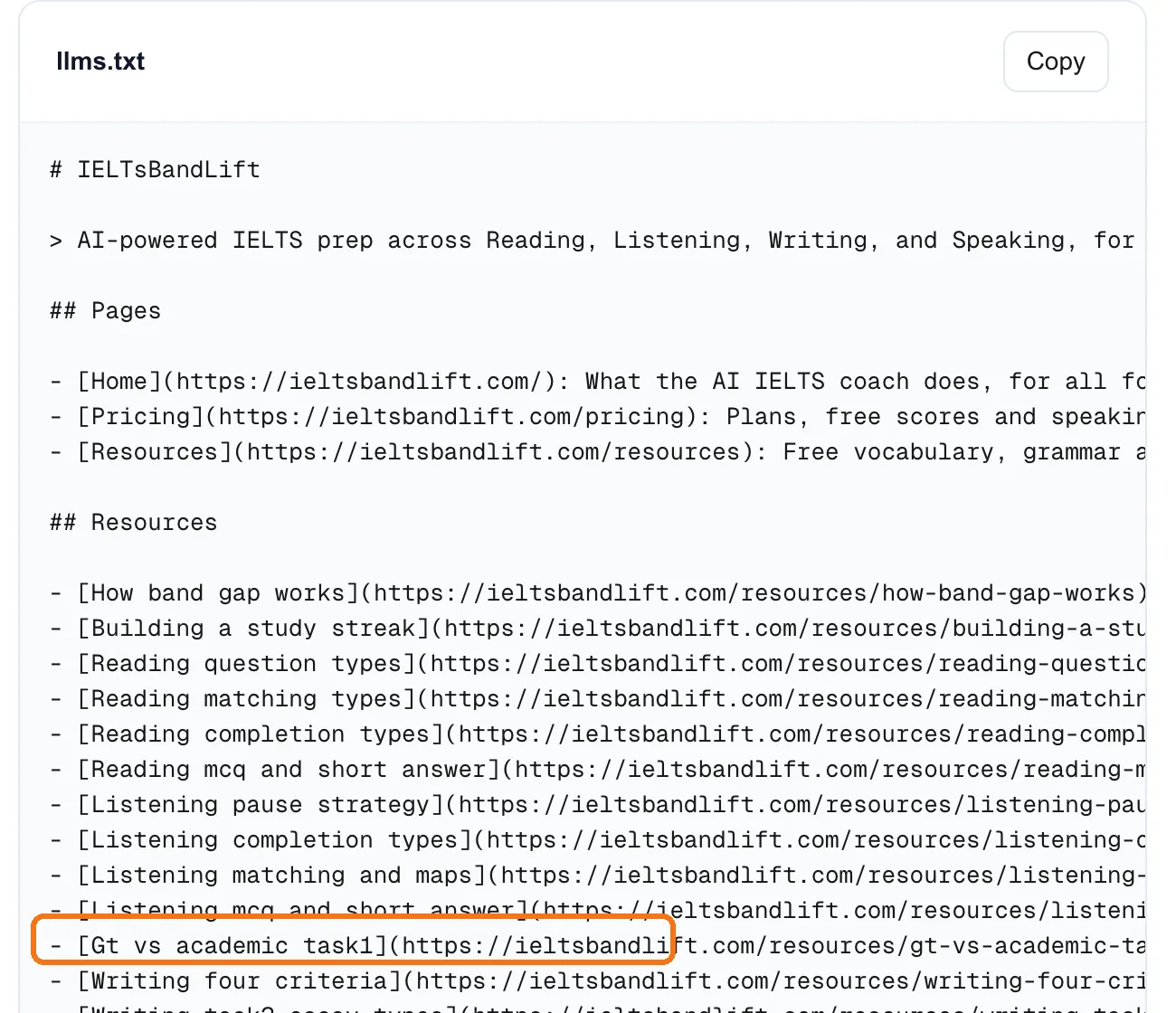
The result is a good first draft. Before uploading it, fix the link titles. Ours are made from the page addresses, so some read badly: "Gt vs academic task1", "Reading mcq and short answer". Two minutes of edits makes them "General Training vs Academic Task 1" and "Reading: multiple choice and short answer".
Then save it as llms.txt at your site's root, next to robots.txt. On a Next.js site like ours, that means the public/ folder.
Where we are: our llms.txt is generated. Cleaning up the titles and uploading it are still on our list.
Done when
- You've read your robots.txt and know what each line does
- Answering and AI search bots aren't blocked, in robots.txt or by your host
- You've decided, on purpose, whether to allow training bots
- You have an llms.txt with your name, a one-line summary and clean link titles, ready to upload