Every draft SEODojo writes, from the Editor, Autopilot, Programmatic SEO, News or YouTube, lands in the Publish Queue first. Nothing reaches your site until you approve it. This lesson is about using that moment well, because it's the last chance to catch a mistake before it's public.
What's in the queue
Open Publish Queue and scroll to Queue. Ours had three drafts: our IELTS speaking guide, plus the news and YouTube drafts from lesson 3.5. Each row shows the title, the keyword, its status and when it was created, with Review, Approve and Remove.
Note: There's an Approve all button above the list. Ours said "Approve all (3)", and two of those three drafts must never go live (lesson 3.5 explains why). Approve one at a time unless you've read every draft in the queue.
Step 1: Review
Click Review. You see the draft exactly as it will be published, with its title and meta description above it. The preview and the published version come from the same code, so what you read here is what ships.
Step 2: Edit
Click Edit. The title, meta description and text become editable, with the formatting buttons on the left and a live preview on the right.
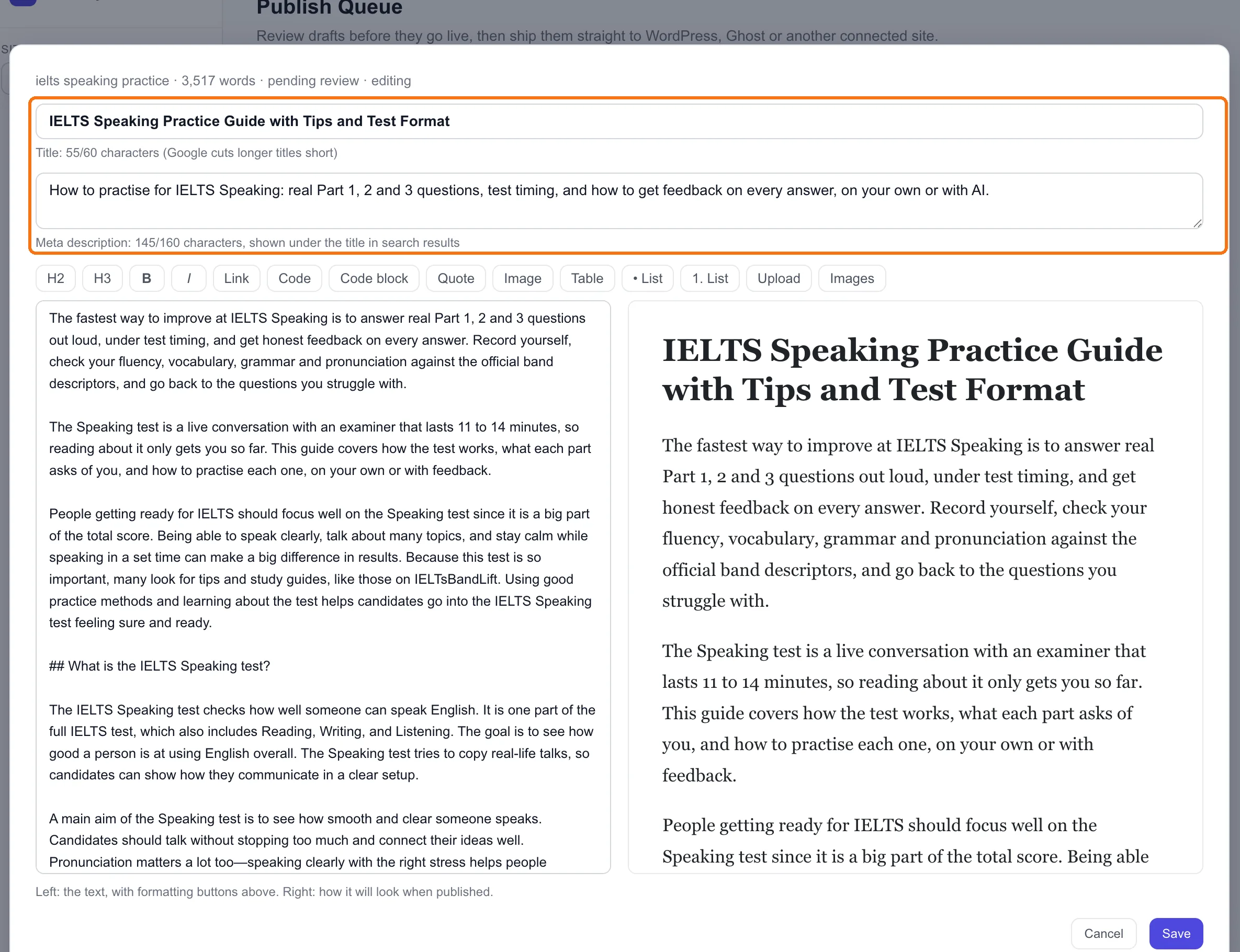
The title. It shows its length: ours is 55 of 60 characters. Google cuts longer titles short in its results, so stay under 60 and put the keyword early. "IELTS Speaking Practice Guide with Tips and Test Format" does both.
The meta description. This is the line under your title in search results. Ours was generated as "This article explains IELTS speaking practice methods and test format to help candidates…", which describes the article without giving anyone a reason to click. We rewrote it to say what the reader gets:
How to practise for IELTS Speaking: real Part 1, 2 and 3 questions, test timing, and how to get feedback on every answer, on your own or with AI.
That's 145 of 160 characters. Around 150 is a good length.
The text. This is where Module 3's checks pay off. Here's everything we changed in our draft, and why:
- The opening. We replaced three paragraphs of "what IELTS is" with a two-sentence answer to "how do I practise" (lesson 3.3).
- An invented rule. "Pause less than 3 seconds between ideas… needed for Band 7" isn't in the band descriptors. We replaced it with plain, true advice (lesson 3.4).
- Apps we couldn't verify. The draft recommended "IELTS Prep" and "IELTS Speaking Assistant", one of which supposedly "scores your answer on vocabulary and grammar from 0 to 9". We couldn't confirm either one. We replaced the paragraph with what our own speaking sessions actually do, from our own pricing and home pages.
- A wrong time. It said speaking clubs "usually give 5 minutes for Part 2 answers". Part 2 is one minute to prepare and up to two to speak. We corrected it.
- Our name. "IELTSBandLift" in the body became "IELTsBandLift".
Notice that items 3 and 4 weren't on our list from lesson 3.2. We only found them by reading the whole draft in the queue. Read every paragraph before you approve, even the ones that look fine at a glance.
Click Save. The draft stays in the queue, still pending review, with your changes.
Step 3: Check the URL
Each article's URL comes from its keyword, not its title. Ours will be ielts-speaking-practice: short, readable, and the exact phrase people search. Where it sits on your site (say /blog/ielts-speaking-practice) is set by the destination (lesson 4.1).
Step 4: Approve, then publish
When you're happy, click Approve, then Publish when you're ready for it to go live. You can also select several drafts and approve, publish or remove them together.
Publishing creates a real post on your site, and it can't be undone from SEODojo. To take a post down, delete or unpublish it on your site.
Where we are: our speaking guide is edited and saved, pending review, and not published yet. It's waiting for a final read.
Done when
- You've opened one draft with Review and read every paragraph
- The title is under 60 characters with the keyword near the start
- The meta description tells a searcher what they'll get, in about 150 characters
- Every claim, number, product name and spelling of your brand is checked
- It's approved, or you know exactly what's left before you approve it