Clients want to see results without logging in to anything. The AI Visibility share link gives them a live, read-only report, and white-label branding makes it look like yours.
Step 1: Create the share link
On AI Visibility → Overview, scroll to Reports and click Create share link.
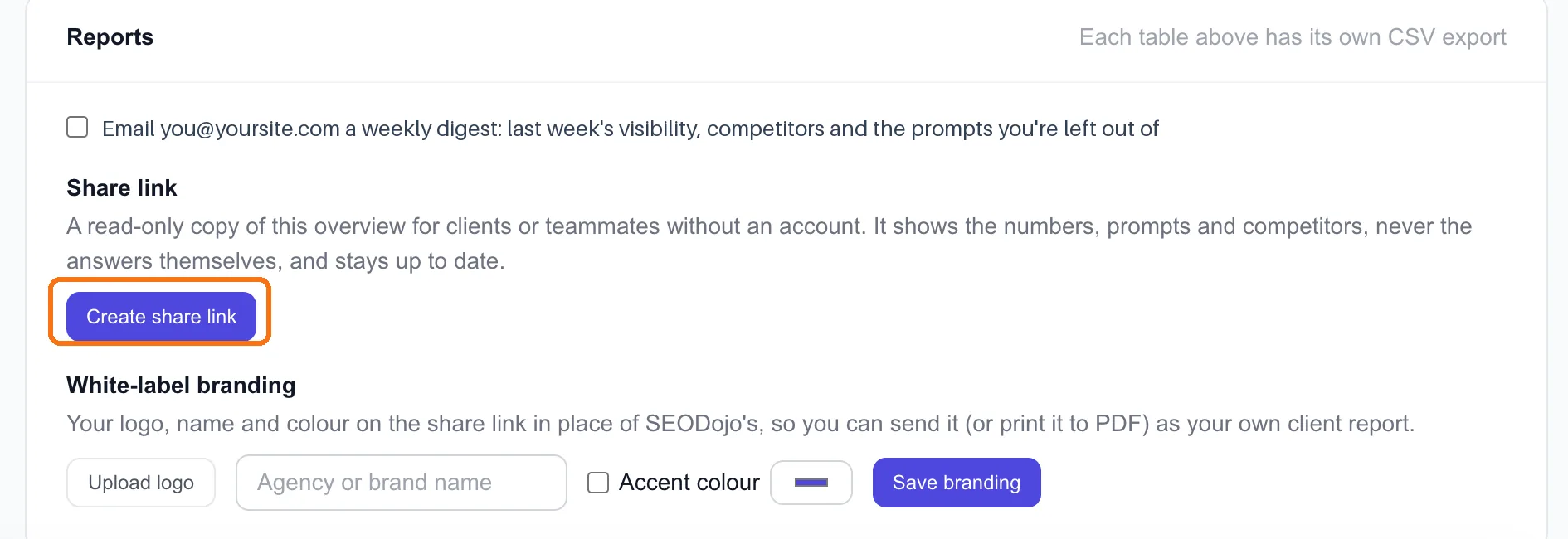
The link opens a read-only copy of the Overview for anyone who has it. No account needed, and it stays up to date as new checks come in, so you send it once.
What it shows: the numbers (visibility, the engines, the trend), the tracked prompts and the competitors. What it never shows: the AI answers themselves.
Only the workspace owner can create or revoke a link (lesson 8.2). If a client relationship ends, revoke it and the link stops working.
The share link is on Pro. Branding it is on Scale.
Step 2: Brand it
Under White-label branding:
- Upload logo: your agency's logo.
- Agency or brand name: shown in place of SEODojo's.
- Accent colour (tick the box to use it): matches the report to your brand.
- Click Save branding.
The share link now carries your logo, name and colour instead of SEODojo's. Send it as a link, or print it to PDF from the browser for a monthly report.
Step 3: Make the report mean something
A link full of numbers isn't a report. Clients need to know what the numbers mean, and what you did. Before sending it each month, write three lines:
- Where we are: "ChatGPT now names you in 3 of your 5 tracked questions, up from 0 in October."
- What we did: "Published the speaking practice guide, got you added to two of the list articles ChatGPT cites."
- What's next: "Next month: the pricing page, so engines quote your real prices."
That's the part clients pay for. The link is the evidence.
Tip: Set expectations early. Lesson 7.1's first result for our own site was 0 of 34. Most clients start near zero too. Say so in the first report, so the second one looks like progress rather than a surprise.
Done when
- One client has a share link
- It carries your logo, name and colour (Scale)
- Your monthly note says where you are, what you did and what's next
- You know how to revoke the link