Ten minutes reading page one saves you from writing the wrong article. Google has already told you what it thinks a good answer looks like. It's the ten pages it chose to show.
The SERP Analyzer reads those pages for you and pulls out what they have in common. Here it is for "ielts speaking practice" in India, the keyword we picked in lesson 2.1.
Step 1: Analyze the keyword
Open SERP Analyzer, type the keyword, set the market (India for us) and click Analyze keyword. The first time takes about 30 seconds and uses one of your monthly analyses (Free includes 5). After that it's saved, and looking again is free. Keywords you've already analyzed are in the dropdown.
You can also start from Analyze → in Keyword Research.
Step 2: Look at who's ranking
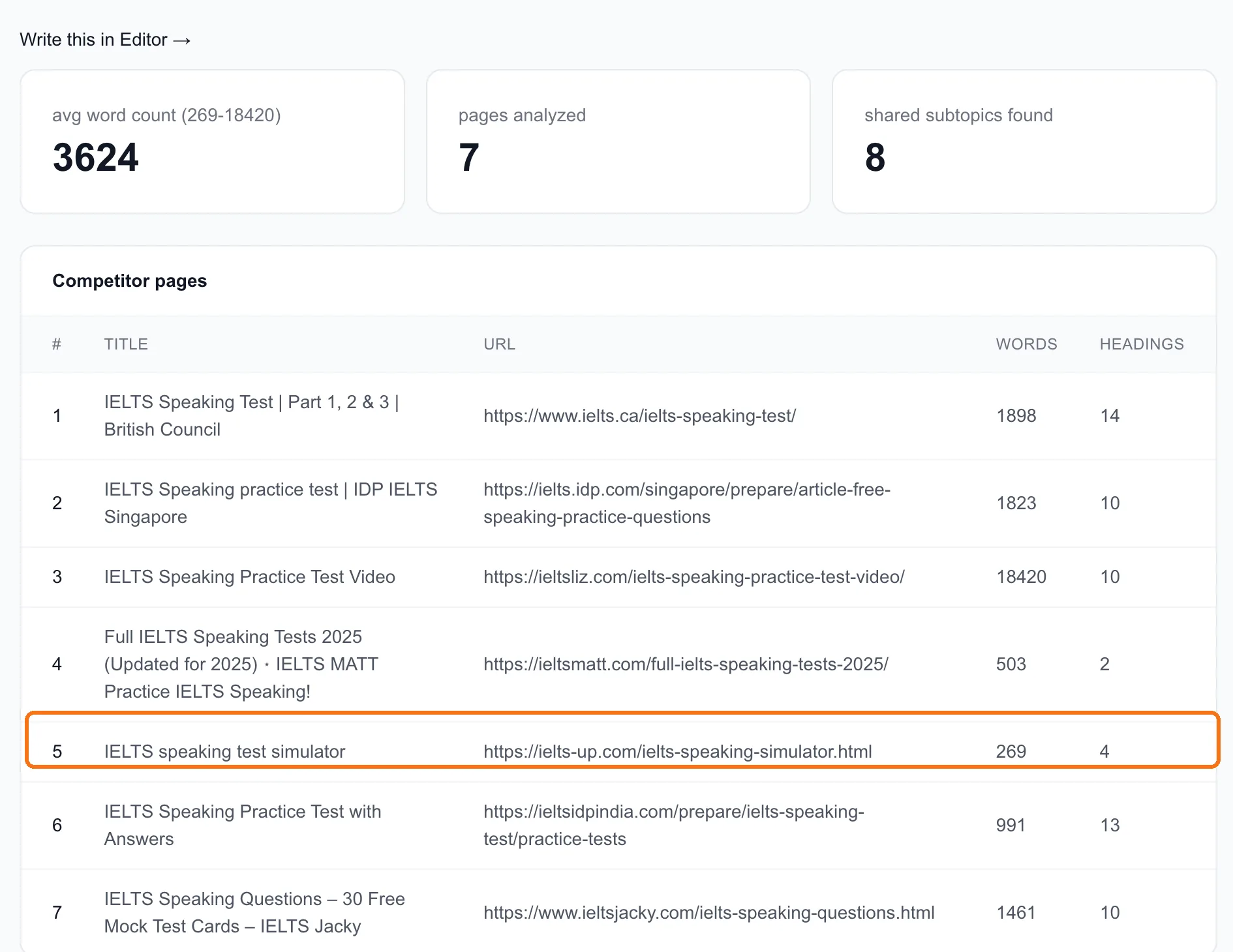
Seven pages were analyzed: on average 3,624 words, ranging from 269 to 18,420. One result, a YouTube video, couldn't be fetched, so it's listed under Fetch failures and left out of the averages.
Don't skim this table. Read it with five questions in mind:
- What kind of pages are they? Ours are mostly practice-test pages and guides, plus one simulator and a video. People want to practise, not read a history of the test.
- Who are they? Two are official exam sites (ielts.ca and IDP). The rest are independent sites, some of them small. If page one were all official sites, we'd look for a different keyword.
- How long are they really? Ignore the average. One 18,420-word page drags it up. Most are between 500 and 1,900 words. You don't need to write 3,600.
- Is there a weak result? #4 (ieltsmatt.com) has 503 words and just 2 headings. #5 is a 269-word simulator. Pages like these are the ones a better page can push down.
- Is there a video? There's a YouTube result, so Google thinks some searchers want to watch. A short video on your page can help.
Step 3: Read what they cover
Scroll down to Target terms and Shared subtopics.
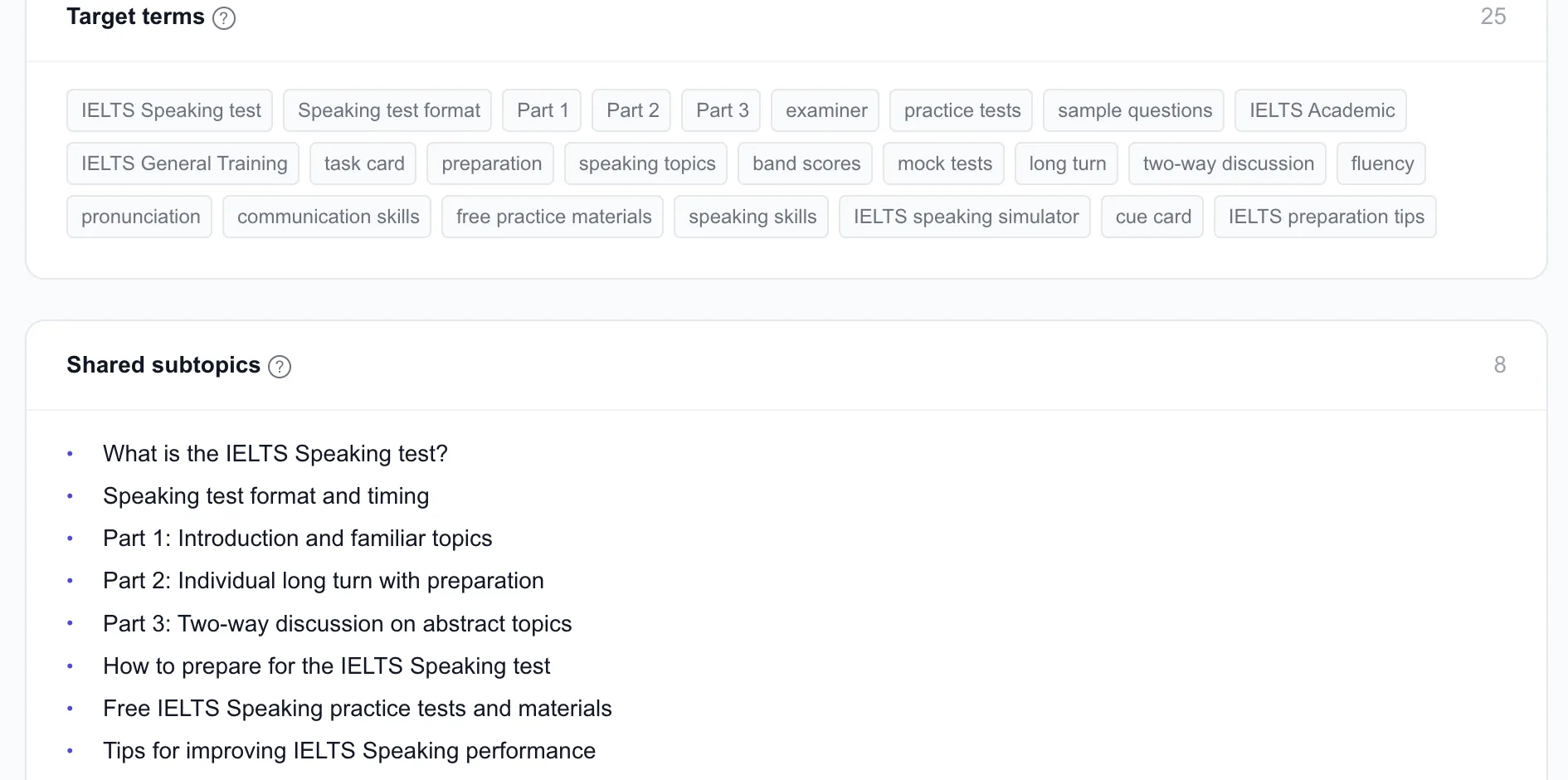
Shared subtopics are the sections most ranking pages have. For us there are eight: what the speaking test is, its format and timing, Part 1, Part 2, Part 3, how to prepare, free practice materials and tips. A page that skips any of them looks thin next to the others.
Target terms are the words and phrases they use: "cue card", "long turn", "fluency", "pronunciation", "band scores". You'll use them naturally if you cover the subtopics. The Editor (lesson 3.1) shows which ones your draft has.
Step 4: Write your brief
Here's ours, in four lines. It took five minutes to write from what's on these two screens:
- Page type: a practice page, not just a guide. Real Part 1, 2 and 3 questions, with a way to try answering them.
- Must cover: the 8 shared subtopics.
- Length: around 1,500–2,000 words. Enough to cover the subtopics properly, no padding.
- What we add that they don't: feedback. None of the ranking pages tells you how your answer would score. Our app's speaking sessions do, so the page ends by showing what a scored answer looks like and how to try one.
That last line is the important one. Covering what page one covers gets you into the conversation. Having something they don't is what moves you up it.
Step 5: Go and write it
Write this in Editor →, right above the results, opens the Editor on this keyword with everything above as its scoring target. That's lesson 3.1.
Done when
- You've analyzed one keyword from your shortlist, in the right market
- You can say what kind of page wins it, and spot the weakest result on page one
- You've listed the shared subtopics your page must cover
- You've written a four-line brief, ending with what you'll add that page one doesn't have