Most people pick keywords by size. The biggest number wins. That's the fastest way to spend six months writing articles nobody ever finds.
This lesson shows a better way, with real numbers. We researched keywords for ieltsbandlift.com, and the keyword we chose to write for first gets about a quarter of the searches of the obvious one. It's the right choice anyway, and by the end you'll see why.
Step 1: Pick the market your customers are in
Open Keyword Research. Before typing anything, set the Market in the top right. Search volumes differ hugely by country.
Most of our customers are preparing for IELTS in India, so we picked India and English. That one setting changed everything below: "ielts speaking practice" gets 1,900 searches a month in India and only 210 in the United States.
Step 2: Start broad with Find related keywords
If you're not sure where to start, the Based on your site chips are suggestions SEODojo made from your homepage. Ours included "IELTS preparation", "speaking practice" and "writing correction". Click one, or type your own broad topic into Find related keywords.
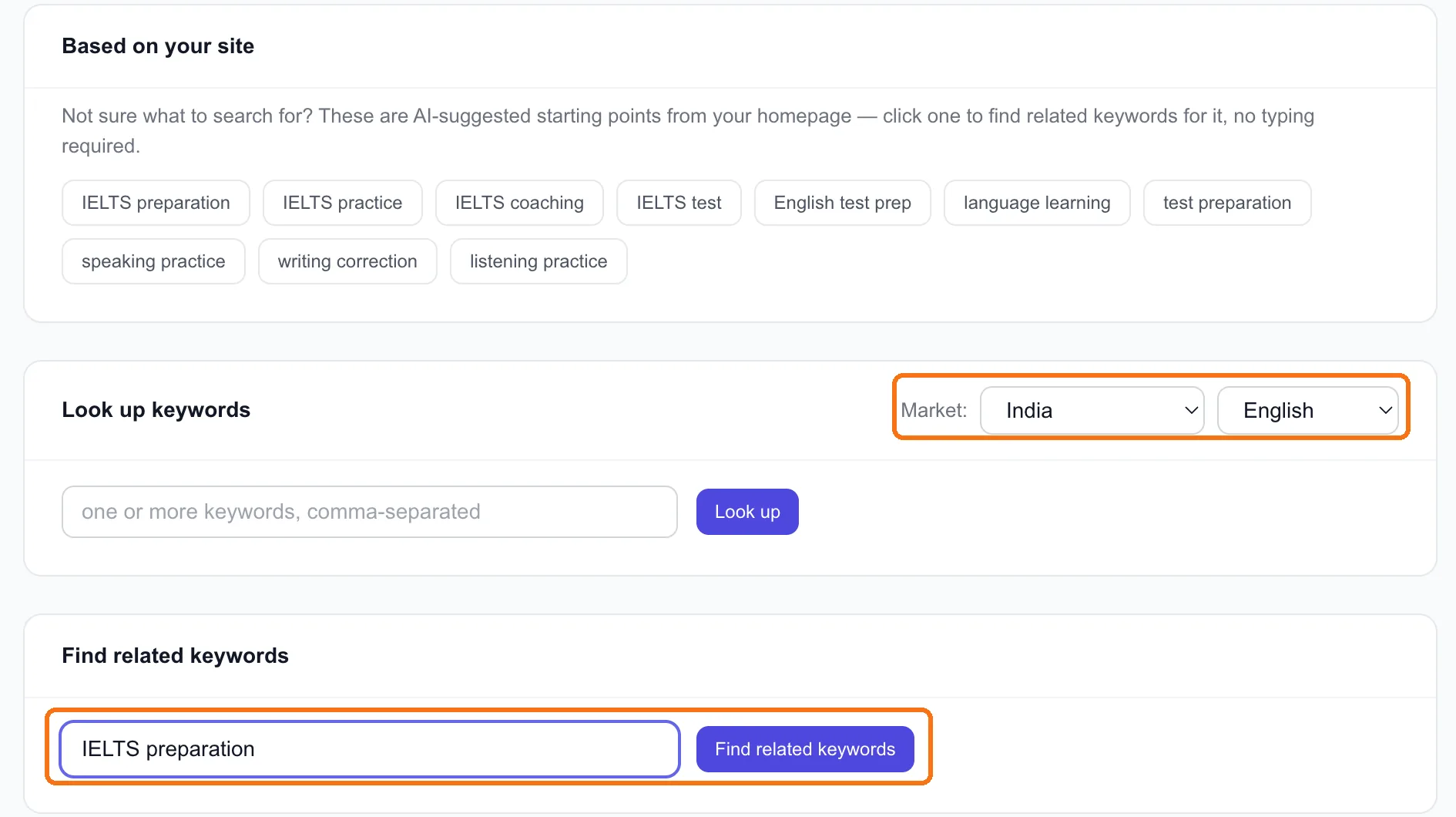
We typed IELTS preparation. A few seconds later we had the related searches, each with its numbers. Then we used Look up for five more specific keywords we had in mind, closer to what our app actually does. Each search uses one research lookup (Free includes 10 a month), and results are kept for 30 days, so looking at them again is free.
Step 3: Read the table
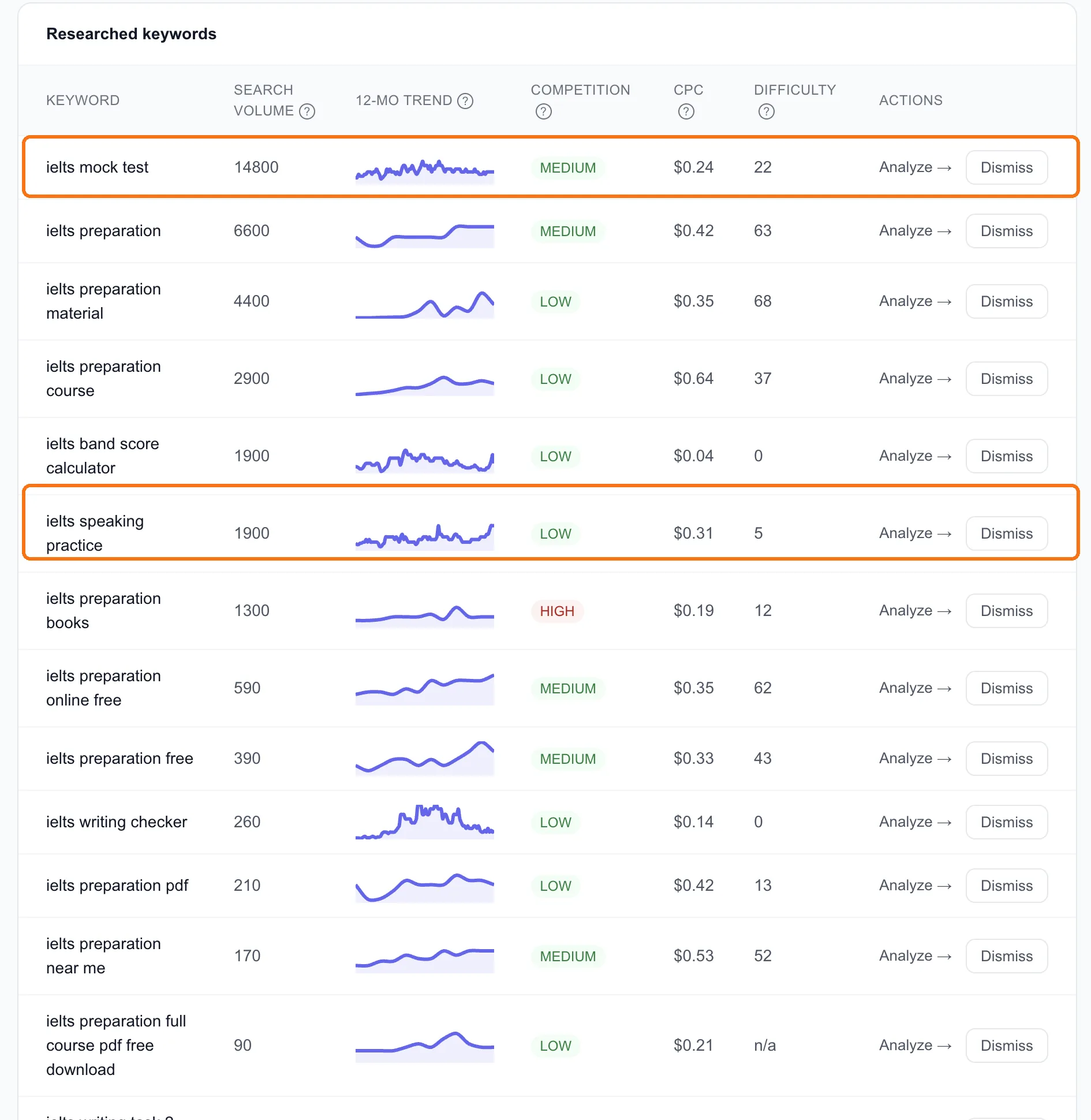
Every column answers a different question:
- Search volume: how many searches a month, on average. This is the size of the prize.
- 12-mo trend: whether it's seasonal or growing. A keyword that spikes one month a year needs its page published well before that month.
- Competition: how many advertisers bid on it in Google Ads. It's not how hard it is to rank. "ielts preparation books" shows High competition (lots of bookshops advertising) and a difficulty of just 12.
- CPC: what advertisers pay per click. A higher CPC usually means the searchers are closer to buying.
- Difficulty: from 0 to 100, how hard it is to reach Google's top 10. This is the one to watch for a new site.
Step 4: Shortlist with three questions
Here's what we found, and how we picked:
| Keyword | Volume | Difficulty |
|---|---|---|
| ielts mock test | 14,800 | 22 |
| ielts preparation | 6,600 | 63 |
| ielts preparation course | 2,900 | 37 |
| ielts band score calculator | 1,900 | 0 |
| ielts speaking practice | 1,900 | 5 |
| ielts writing checker | 260 | 0 |
For each one we asked three questions.
1. Can we realistically rank for it? "ielts preparation" has three times the searches of most of the list, and a difficulty of 63. Our homepage gets 8 clicks in 60 days. We won't get into that top 10 this year. Cross it off, for now.
2. Does the searcher want what we offer? This is search intent, and it's where most keyword lists go wrong. Someone typing "ielts preparation books" wants a book. We don't sell books. Someone typing "ielts speaking practice" wants to practise speaking, which is exactly what our app's speaking sessions are for.
3. What kind of page would answer it? "ielts band score calculator" (difficulty 0) is a search for a tool, not an article. If you can build a simple calculator page, a keyword like this is about as easy as it gets. If you can only write about calculators, skip it.
Our shortlist:
- ielts speaking practice: 1,900 a month, difficulty 5, and it matches the product. This is the one we wrote for first (lesson 7.5).
- ielts mock test: the biggest number on the list at 14,800, with a beatable difficulty of 22. It's worth it only if we offer something you can actually take as a mock test, so it waits until we do.
- ielts band score calculator: a small tool page, worth building.
Tip: "ielts writing task 2 band 9 essay" came back with no data (n/a). That doesn't mean nobody searches it. Very specific phrases are often too small to measure. They can still be great targets: low competition, and the people searching them know exactly what they want.
Step 5: Send a keyword on
Each row has Analyze →, which reads the pages ranking for that keyword so you can see what you're up against. That's lesson 2.2. Use Dismiss to clear the ones you've ruled out, so the table stays a shortlist.
Done when
- The market is set to where your customers are
- You've run one broad Find related keywords search and looked up a few specific ones
- Each keyword on your shortlist passes all three questions: you can rank, the searcher wants what you offer, and you know what page to build
- You have 3–5 keywords, and you know which one comes first