The Editor scores your draft live against the pages already ranking for your keyword. As you type, it tells you which sections you've covered, which terms you've used, and what's still missing.
It's the most useful screen in SEODojo, and the easiest one to misuse. This lesson shows both.
Step 1: Pick the keyword
Open Editor. Type the keyword into Analyze a new keyword, or pick one from the dropdown. Keywords you researched in lesson 2.1 are listed there too. A new keyword takes about 30 seconds to analyze and uses one of your monthly analyses. After that it's free.
We used ielts speaking practice, analyzed in lesson 2.2.
Step 2: Write, and watch the right-hand side
Write in the box on the left. About a second after you stop typing, the right-hand side updates. Here's our draft:
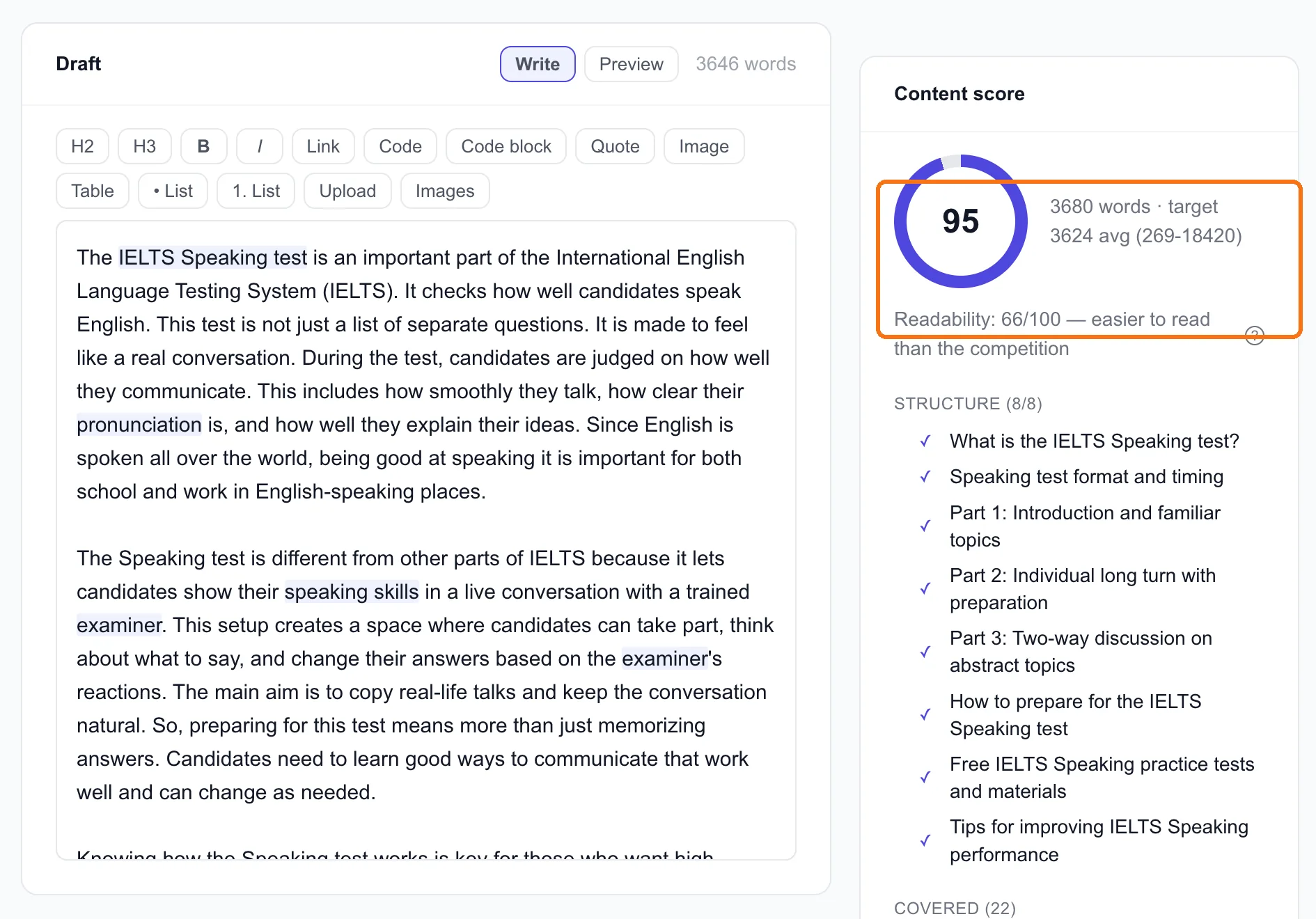
What each part means:
- Content score (95). How closely the draft covers what the ranking pages cover, out of 100.
- Word count against target (3,680 vs 3,624). The target is the average of the ranking pages. Remember lesson 2.2: one 18,420-word page pulls that average up, and most of the pages are under 2,000 words.
- Readability (66/100, "easier to read than the competition"). Higher is easier. Easier usually wins, especially for an audience reading in their second language, like ours.
- Structure (8/8). The shared subtopics from lesson 2.2, ticked off as your headings cover them.
- Covered (22). Target terms your draft already uses, highlighted in the text as you write.
Step 3: Deal with what's missing, on purpose
Scroll down the right-hand side.
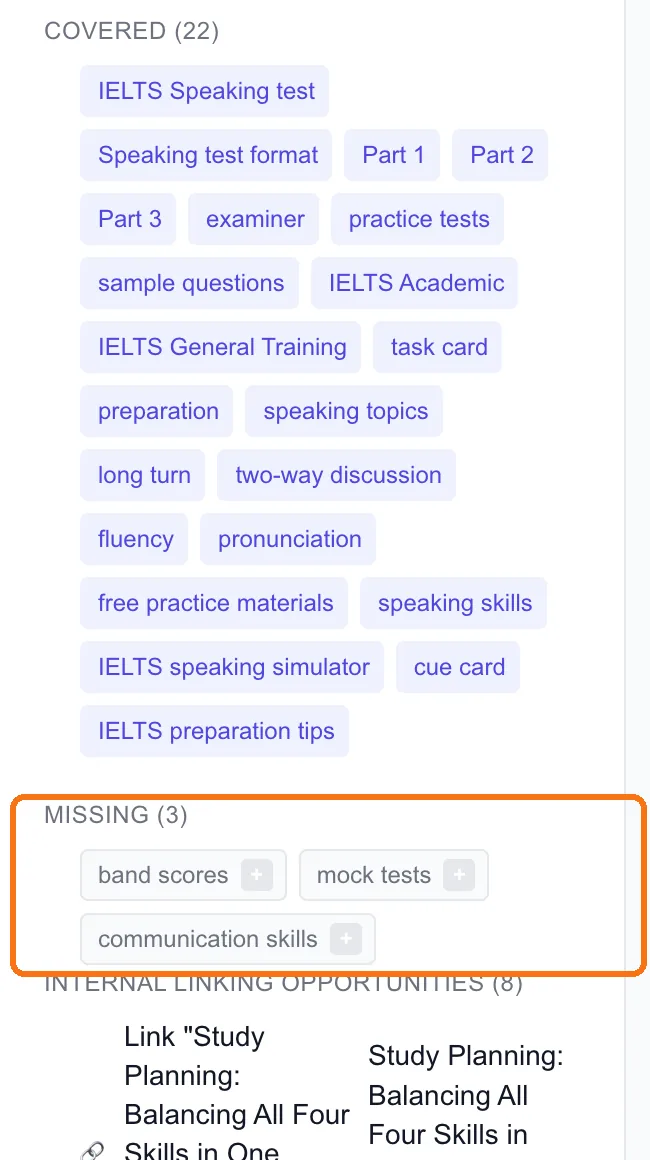
Missing (3) lists target terms the draft doesn't use yet. Ours: band scores, mock tests and communication skills. Click the small + next to one and AI writes a sentence covering it, inserted at your cursor.
Don't add them all by reflex. Ask whether each one belongs:
- band scores: yes. Anyone practising speaking wants to know what score they're heading for. It deserves a real paragraph, not one sentence.
- mock tests: yes, and it's also a keyword worth 14,800 searches a month (lesson 2.1). One sentence here, a full page of its own later.
- communication skills: maybe. It's vague. If it fits naturally, fine. If not, leave it.
Internal linking opportunities (8) are pages on your own site worth linking to from this draft. Use them. Every link you add is one less orphan page (we have 280 of those, lesson 1.4).
Tip: Look at the suggested link titles. Ours all end "| IELTsBandLift — IELTsBandLift": our site repeats the brand name in every page title. The Editor is showing you a site problem, not a draft problem. It's worth fixing, once, in the site's title template.
What the score doesn't measure
A 95 means this draft covers what page one covers. It doesn't mean the draft is good, or better than page one.
Ours proves it. It scored 95, and it opens with "The IELTS Speaking test is an important part of the International English Language Testing System", which every one of those seven pages already says. A score can't tell that your opening is generic, that a claim is wrong, or that you've added nothing new.
So use the score as a checklist, not a target:
- Get the structure to 8/8, or close. Missing a whole section is a real gap.
- Look at every missing term and decide, yes or no.
- Then stop chasing points. Spend the time on what lesson 2.2's brief said you'd add that page one doesn't have.
Going from 85 to 95 by adding terms almost never matters. Adding one thing the other pages don't have usually does.
Done when
- Your draft is scored against the right keyword, in the right market
- Structure is complete, or you've chosen to skip a section and know why
- Each missing term is added or deliberately left out
- You've added the internal links that make sense
- You've stopped at "covers page one" and moved on to "better than page one"